Wedding Timeline Template Canva
Updated
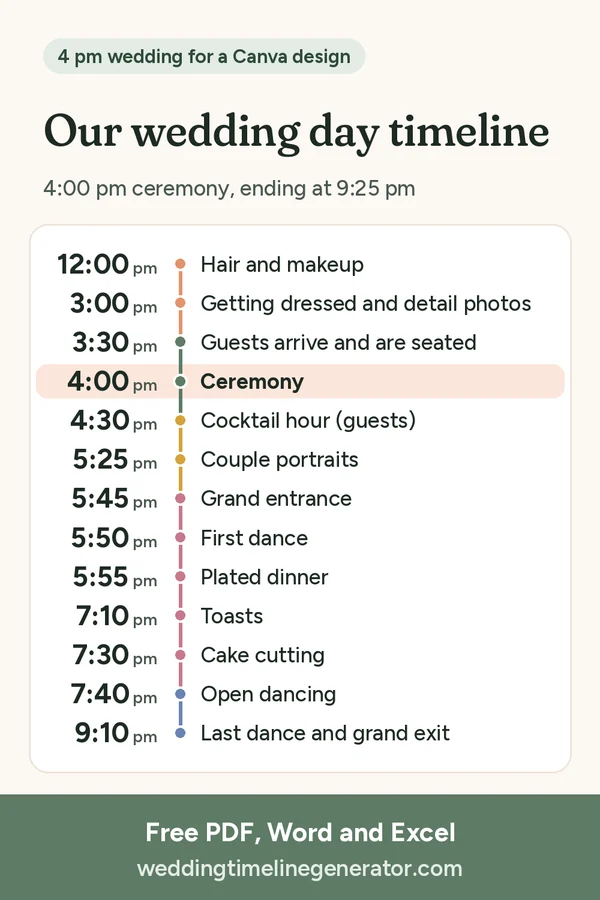
Work out the times for your wedding day, then paste them into a Canva design. The default 4:00 pm day has dinner at 5:55 pm and ends at 9:25 pm.
Try it: change the times in the builder below, or build your full wedding day timeline.
Your wedding day timeline
Export

Change the minutes of any step and the times after it update. Your changes are in every download and in the link you share. Renamed steps stay on this page.
- Getting ready 12:00 pm
- Ceremony 3:30 pm
- Photos 4:30 pm
- Reception 5:45 pm
- Party 7:40 pm
| Time | What happens | Who | Notes |
|---|---|---|---|
| Getting ready | |||
| 12:00 pmuntil 3:00 pm180 min | Hair and makeup | CoupleWedding partyHair and makeup | 4 people, 45 min each, 1 artist. |
| 3:00 pmuntil 3:45 pm45 min | Getting dressed and detail photos | CoupleWedding partyPhotographer | Rings, shoes, invitations and the dress or suit. |
| Ceremony | |||
| 3:30 pmuntil 4:00 pm30 min | Guests arrive and are seated | GuestsVenueOfficiantDJ or band | Prelude music; ushers seat guests. |
| 3:45 pmuntil 4:00 pm15 min | Final touch-ups and line-up | CoupleWedding partyHair and makeupOfficiant | Out of sight while guests arrive. |
| 4:00 pmuntil 4:30 pm30 min | Ceremony | CoupleWedding partyOfficiantGuestsPhotographerDJ or band | |
| Photos and cocktail hour | |||
| 4:30 pmuntil 4:55 pm25 min | Family photos (8 groups) | CouplePhotographerGuests | Give the photographer a written group list and name one relative per side to round people up. |
| 4:30 pmuntil 5:45 pm75 min | Cocktail hour (guests) | GuestsCateringDJ or bandVenue | Guests mingle while the couple has photos. |
| 4:55 pmuntil 5:25 pm30 min | Wedding party photos | CoupleWedding partyPhotographer | |
| 5:25 pmuntil 5:45 pm20 min | Couple portraits | CouplePhotographer | Quiet time together; build in a snack and water. |
| Reception | |||
| 5:45 pmuntil 5:50 pm5 min | Grand entrance | CoupleWedding partyDJ or bandGuests | |
| 5:50 pmuntil 5:55 pm5 min | First dance | CoupleDJ or bandGuestsPhotographer | |
| 5:55 pmuntil 7:10 pm75 min | Plated dinner | CoupleGuestsCatering | Ask the caterer to serve the couple first. |
| 7:10 pmuntil 7:30 pm20 min | Toasts | CoupleWedding partyGuestsDJ or band | Agree on speakers (about 3 minutes each) beforehand. Giving a toast? Timed examples for each speaker |
| 7:30 pmuntil 7:40 pm10 min | Cake cutting | CoupleGuestsPhotographerCatering | |
| Party | |||
| 7:40 pmuntil 9:10 pm90 min | Open dancing | CoupleGuestsDJ or band | |
| 9:10 pmuntil 9:25 pm15 min | Last dance and grand exit | CoupleGuestsDJ or bandPhotographer | |
Save to Pinterest Keep this timeline on your wedding board.
Work out the times first, then design it in Canva
Canva templates give you the look but leave every time blank, and one change means retyping the rows after it. This builder works out the times; you can then copy them into any Canva design.
We do not export to Canva. The builder gives you a print view, a Word file and a CSV, and the times below are the part a Canva template cannot do for you.
Here is the default 4:00 pm day. Dinner starts at 5:55 pm and the night ends at 9:25 pm.
| Time | What happens |
|---|---|
| 12:00 pmuntil 3:00 pm180 min | Hair and makeup |
| 3:30 pmuntil 4:00 pm30 min | Guests arrive and are seated |
| 4:00 pmuntil 4:30 pm30 min | Ceremony |
| 4:30 pmuntil 5:45 pm75 min | Cocktail hour (guests) |
| 5:55 pmuntil 7:10 pm75 min | Plated dinner |
| 7:10 pmuntil 7:30 pm20 min | Toasts |
| 7:30 pmuntil 7:40 pm10 min | Cake cutting |
| 7:40 pmuntil 9:10 pm90 min | Open dancing |
| 9:10 pmuntil 9:25 pm15 min | Last dance and grand exit |
How to put your timeline into Canva
- Set your ceremony time in the builder and answer the few questions
- Open the print view or download the Word file and copy the table
- In Canva, start from a wedding schedule or itinerary template, or add a table element
- Paste the times and blocks, then change fonts and colours to match your invitations
- Export from Canva as a PDF to share with vendors, and keep the builder link for later changes
Canva or the builder: which to use
Use the builder for the schedule, because it moves every later block when one changes. Use Canva for a pretty printed sign or welcome card. If you edit times after designing, change the builder first and paste again.
Get your timeline times
Open the builder, enter your ceremony time, answer a few questions and copy the result. It is free and needs no account.
What US searches say
33% of US wedding planning searches ask for a template or a file, like this one.
Build your full wedding day timeline
The reception is one part of the day. The wedding timeline builder also plans hair and makeup, photos, travel and the ceremony, and you can start from a preset such as first look or two venues.
Prefer paper? Open the printable version of this timeline or the blank template.
Want this plan in your inbox? Email me this timeline from the full-day builder: you get a link to open on your phone or forward to your photographer.
Frequently asked questions
Is there a wedding timeline template for Canva?
Canva has many layouts, but the times are blank. Build the times here, then paste them into a Canva design.
Can this tool export to Canva?
No. It offers a print view, a Word file and a CSV, which you can copy into Canva.
Is the timeline free?
Yes. The builder, the print view and the downloads are free and need no account.
Can I send the Canva design to vendors?
Yes. Export it as a PDF from Canva, or send the printed page from the builder.
How do I keep the Canva design in step when a time changes?
Change the time in the builder first, copy the updated rows, and paste them over the old ones in Canva. Then export a new PDF and send it to vendors, so nobody works from the old version.
Should I use Canva or print the timeline from the builder?
Print from the builder when you only need a plain copy for vendors. Use Canva when you want a designed page. The times are the same either way, so check them in the builder first.